

Is your office chair leaving you uncomfortable after hours of work? The secret to a better sitting experience could be as simple as adjusting the tilt of your chair.
When you know how to change your chair’s tilt, you can find the perfect angle that supports your back and boosts your focus. In this guide, you’ll learn easy steps to adjust your office chair tilt quickly and safely. Keep reading to discover how a small tweak can make a big difference in your comfort and productivity.

Credit: manuals.plus
Types Of Office Chair Tilt Mechanisms
Office chairs have different tilt mechanisms to improve comfort. These mechanisms let you adjust how the chair moves when you lean back.
Knowing the types helps you choose the right chair and adjust it correctly for your needs.
Tilt Lock
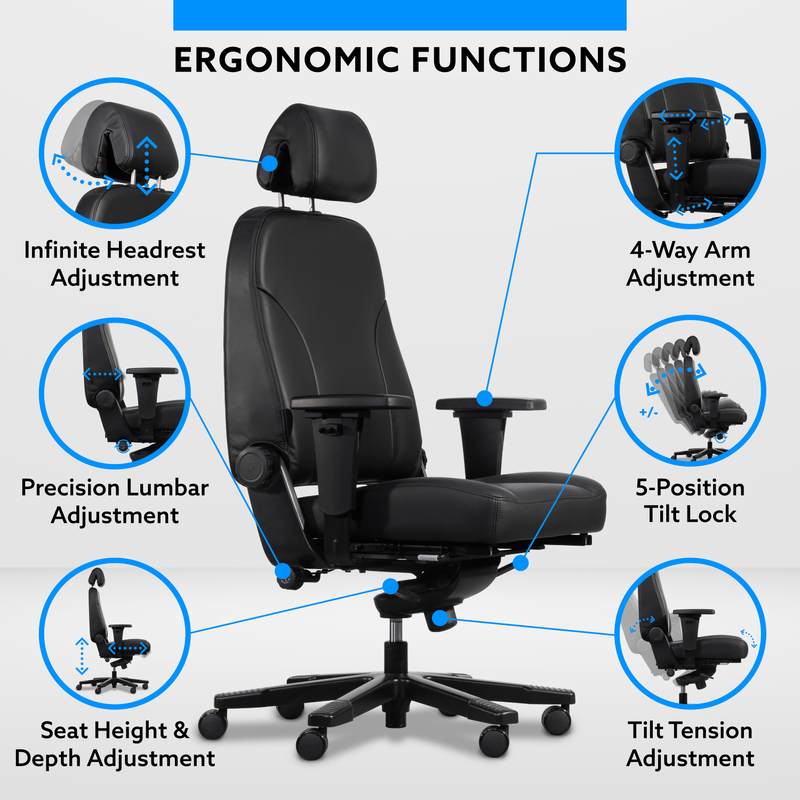
Tilt lock lets you fix the chair in a tilted or upright position. You can lock it to stay still or unlock it to tilt freely.
This feature helps you keep good posture or relax during breaks.
Tilt Tension
Tilt tension controls how hard it is to lean back. You can adjust it to match your body weight.
Higher tension means more effort to recline. Lower tension lets you tilt easily.
- Turn the knob under the seat to change tension
- Adjust it so you feel balanced support
- Proper tension prevents sudden tipping
Synchro Tilt
Synchro tilt moves the backrest and seat together but at different angles. The backrest tilts more than the seat.
This keeps your feet flat on the floor and supports your back well as you recline.
Tools Needed For Adjustment
Adjusting the tilt of an office chair makes sitting more comfortable. You need some simple tools to do this job right.
Most chairs have parts you can change by hand. Some models need extra tools to fix the tilt correctly.
Allen Wrench (hex Key)
An Allen wrench fits into small hexagonal holes on the chair. It helps tighten or loosen screws that hold the tilt mechanism.
Many office chairs come with a matching Allen wrench in the package. If you do not have one, you can buy a set at a hardware store.
Screwdriver
A screwdriver is useful for loosening or tightening screws on the chair’s tilt parts. Most chairs use Phillips or flathead screws.
Before starting, check what type of screws your chair has. Using the right screwdriver avoids damage to the screws.
Lubricant Spray
Lubricant spray helps the tilt mechanism move smoothly. It reduces squeaks and stiffness in the chair parts.
Apply a small amount to the moving parts after adjustment. This keeps your chair working well for a long time.
Gloves
Wearing gloves protects your hands from dirt and sharp edges. It also helps you grip tools better during adjustment.
Use simple work gloves that fit well. They make the process safer and cleaner.
Preparing Your Chair For Tilt Adjustment
Adjusting the tilt of your office chair helps you sit comfortably. Before you start, prepare your chair well. This keeps the process safe and easy.
Getting ready means checking your space and your chair’s details. This guide shows what you should do first.
Clearing The Area
Clear the space around your chair before adjusting the tilt. Remove items that might block your movement.
Make sure you have enough room to lean back and move the chair safely. This avoids accidents or damage.
- Push the chair away from the desk
- Move nearby objects like bags or boxes
- Check for cords or cables on the floor
- Ensure the floor is clean and dry
Checking The Chair Manual
Read your chair’s manual before adjusting the tilt. Manuals give important safety and usage information.
Look for instructions on how to adjust the tilt and any warnings. Following these helps protect your chair and your body.
- Find the tilt adjustment lever or knob
- Note the weight limits for tilting
- Check if tilt lock features are included
- Understand the tilt range and limits
Credit: www.btod.com
Adjusting Tilt Tension
Tilt tension controls how hard it is to lean back in your office chair. Adjusting it helps you find a comfortable position.
This guide shows you how to adjust the tilt tension for better support and comfort.
Locating The Tension Knob
The tension knob is usually under the seat of your office chair. It looks like a round dial or wheel.
Check near the center or front of the chair base. Sometimes it is near the tilt lever.
- Turn your chair upside down if needed
- Look for a large round knob under the seat
- Refer to your chair manual if unsure
Increasing Or Decreasing Resistance
Turn the tension knob clockwise to increase the tilt resistance. This makes leaning back harder.
Turn the knob counterclockwise to decrease resistance. This makes leaning back easier.
- Turn slowly and test the tilt after each adjustment
- Find a balance that feels comfortable and supportive
- Do not force the knob to avoid damage
Setting The Tilt Angle
Adjusting the tilt angle of your office chair helps you sit comfortably. It supports your back and reduces strain during work.
Most office chairs have a tilt mechanism you can change. Learning how to set this tilt angle improves your sitting posture.
Using The Tilt Lock
The tilt lock lets you fix the chair’s angle. It stops the chair from moving backward or forward.
To use the tilt lock, find the lever under the seat. Push or pull it to lock or unlock the tilt.
- Sit in the chair and lean back slightly.
- Move the tilt lock lever to lock the position.
- Check if the chair stays in place when you move.
- Unlock the lever to change the tilt angle again.
Finding The Ideal Recline Position
The right recline angle supports your spine and keeps you alert. It should feel natural and relaxed.
Try small changes in the tilt angle. Find a position that reduces pressure on your lower back.
- Start sitting straight with your feet flat on the floor.
- Lean back slowly until you feel comfortable.
- Lock the tilt if your chair has a tilt lock.
- Adjust until your back feels fully supported.

Credit: www.youtube.com
Adjusting Synchro Tilt Features
The synchro tilt feature lets your chair move both the seat and backrest together. It keeps your body balanced and supported.
Adjusting this feature helps you find a comfortable sitting position. This reduces strain on your back and improves posture.
Understanding Synchro Movement
Synchro tilt means the seat and backrest tilt at different angles. The backrest moves more than the seat.
This design supports your lower back while you recline. It keeps your hips stable and reduces pressure.
- The backrest usually tilts about twice as much as the seat.
- This keeps your spine in a natural position.
- It helps maintain good blood flow to your legs.
Balancing Seat And Backrest
Most office chairs let you adjust the tension of the synchro tilt. This controls how hard it is to recline.
Use the tension knob under the seat to balance the seat and backrest movement. Turn it to make leaning easier or firmer.
- Turn clockwise to increase resistance.
- Turn counterclockwise to decrease resistance.
- Adjust until you feel supported but free to move.
Common Troubleshooting Tips
Office chairs often come with tilt features for comfort. Sometimes the tilt may not work as expected. This guide helps you fix common tilt problems.
Knowing simple checks can save time and keep your chair comfortable. Read on to learn about common tilt issues and easy fixes.
Tilt Not Locking
If your chair tilt does not lock, the locking mechanism might be faulty or dirty. Dust or debris can block the lock from engaging.
Check if the tilt lock lever or knob is fully pushed or turned. Sometimes it needs a firm push to lock properly.
- Clean the tilt lock area with a cloth
- Make sure the lever moves freely
- Apply a small amount of lubricant if stuck
- Test the lock after adjustments
Chair Tilting Too Easily
If your chair tilts back with little effort, the tilt tension might be too low. The tension control adjusts how hard it is to tilt.
Look for a knob under the seat. Turn it clockwise to increase tension. Turn it counterclockwise to decrease tension.
- Locate the tension knob under the seat
- Turn clockwise to make tilting harder
- Turn counterclockwise to make it easier
- Adjust in small steps and test
No Tilt Movement
If your chair does not tilt at all, the tilt mechanism may be stuck or broken. Dirt or rust can cause the parts to seize up.
Try cleaning the mechanism and applying lubricant. If the problem continues, the tilt mechanism may need repair or replacement.
- Check for visible dirt or rust under the seat
- Use lubricant spray on moving parts
- Move the chair back and forth to free parts
- Contact a professional if it still does not move
Maintaining Your Chair For Smooth Tilt
Keeping your office chair's tilt working well needs regular care. Small actions can stop it from sticking or feeling rough.
Simple maintenance helps your chair last longer and stay comfortable every day.
Regular Cleaning
Dust and dirt can build up around the tilt parts. This buildup makes the tilt stiff and hard to move.
Use a soft cloth or a small brush to clean the area under the seat and near the tilt mechanism. Make sure to remove crumbs and dust often.
- Wipe the chair base and tilt lever
- Remove dust from moving parts
- Check under the seat for debris
Lubricating Moving Parts
Lubricants keep the tilt parts moving smoothly. Without lubrication, metal parts may rub and wear out faster.
Use a light machine oil or silicone spray on the tilt hinges and springs. Apply a small amount, then move the tilt back and forth to spread it evenly.
- Choose a lubricant safe for metal and plastic
- Apply sparingly to avoid mess
- Test tilt movement after applying
Frequently Asked Questions
How Do I Adjust The Tilt On My Office Chair?
Locate the tilt lever beneath your chair seat. Pull or push it to unlock the tilt mechanism. Lean back to set the desired angle, then lock the lever to secure the tilt position.
What If My Office Chair Tilt Is Too Stiff?
Check the tension knob usually found under the seat. Turn it counterclockwise to reduce tilt resistance. Adjust slowly to find a comfortable balance between support and ease of reclining.
Can I Lock The Tilt Feature On My Chair?
Yes, most office chairs have a tilt lock. Engage the tilt lock lever or knob to fix the chair in a preferred reclined or upright position for better posture support.
Why Does My Office Chair Tilt Unevenly?
Uneven tilt may result from loose screws or a faulty tilt mechanism. Inspect and tighten all screws. If the problem persists, consult the manufacturer or consider professional repair.
Conclusion
Adjusting your office chair tilt improves comfort and focus. Find the tilt lever or knob under your seat. Gently change the angle to suit your body. A good tilt supports your back well. Take small steps to avoid sudden shifts.
Check your chair’s manual for specific tips. Sitting right helps reduce pain and tiredness. Spend a few minutes adjusting before work. Your chair should feel natural and easy. Comfort leads to better work and less stress. Keep adjusting until it feels just right.


