Are messy wires ruining the sleek look of your TV area? You’re not alone.
Tangled cables can distract from your favorite shows and make your space feel cluttered. But hiding those wires doesn’t have to be a headache. Imagine a clean, organized TV stand where cables are out of sight, yet easy to access whenever you need them.
In this guide, you’ll discover simple, effective tricks to tuck away your wires and transform your entertainment area into a neat, stylish spot. Ready to clear the clutter and enjoy a flawless setup? Keep reading—you’ll be amazed at how easy it can be.
Choose The Right Tv Stand
Hiding wires behind your TV stand makes your room look neat. Picking the right TV stand helps keep cables out of sight.
Some stands have special features for cable management. Size and shape also matter for hiding wires well.
Look For Built-in Cable Management
Choose a TV stand with built-in cable management. These stands have holes or channels to guide wires.
This feature keeps wires organized and hidden behind the stand. It also makes cleaning easier.
- Holes at the back let wires pass through neatly
- Channels inside shelves keep cables from tangling
- Some stands have covers to hide wires completely
Consider Stand Size And Shape
Pick a TV stand that fits your TV and room space. Bigger stands often hide wires better.
Shape matters too. Stands with closed backs or panels hide cables more easily than open ones.
- Tall stands can hide longer cables behind them
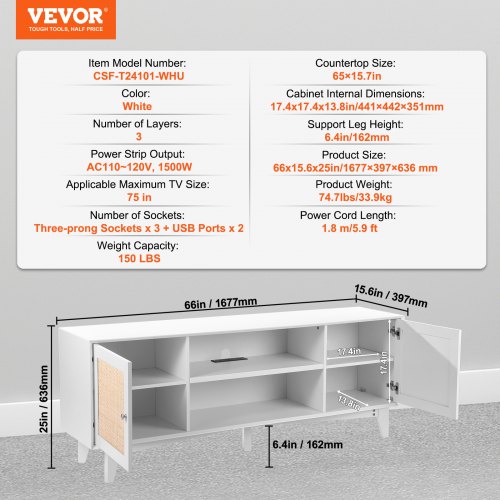
- Wide stands offer space to place power strips out of sight
- Closed-back designs block wires from view
- Open-back stands may need extra cable covers or clips
Use Cable Covers And Raceways
Hiding wires behind your TV stand makes the area look neat. Cable covers and raceways help organize and protect cords. They keep wires out of sight and prevent tripping hazards.
These tools are easy to use and fit in different room styles. They come in various sizes and shapes to hold many cables at once.
Select Matching Colors
Choose cable covers that match your wall or floor colors. This makes wires blend in better and stay less noticeable. Many covers come in white, black, beige, or clear options.
Matching colors help keep the focus on your TV and decor. You can paint some covers to match your walls if needed.
- Pick white covers for light walls
- Use black covers for dark walls or stands
- Choose clear covers for mixed colors
- Paint covers to match unique wall colors
Install Along Walls And Floors
Place cable covers and raceways close to walls or floors. This keeps wires hidden and organized. Use corners and edges to guide cables neatly.
Secure covers with adhesive strips or screws. Make sure they are tight and flat to avoid tripping. Keep cables loose inside to prevent damage.
- Run covers along baseboards or edges
- Hide wires behind furniture legs
- Avoid sharp bends in cables
- Check covers regularly for loosening
Bundle And Secure Wires
Hiding wires behind your TV stand keeps your space neat. Bundling wires helps reduce tangles and clutter.
Secure wires to prevent them from moving or getting damaged. This also makes cleaning easier.
Use Cable Ties And Velcro Straps
Cable ties and Velcro straps keep wires together tightly. They stop wires from spreading out or tangling.
Velcro straps are reusable and easy to adjust. Cable ties are stronger but need to be cut to remove.
- Group wires by device or type
- Wrap straps around bundles securely
- Use Velcro for flexible setups
- Use cable ties for permanent bundling
Label Each Cable For Easy Identification
Labeling cables helps you find the right wire quickly. It saves time when you unplug or move devices.
Use simple labels like device names or colors. Attach labels near the plug or along the wire bundle.
- Use tags or adhesive labels
- Write clear, short names
- Label both ends of each wire
- Replace labels if they wear out

Credit: www.freemalaysiatoday.com
Hide Cables Behind Furniture
Wires and cables behind your TV stand can look messy. Hiding them keeps your space neat.
You can hide cables easily using simple tools and smart placement. This helps protect cables too.
Position Stand Close To Wall
Place your TV stand close to the wall to reduce visible cables. This hides cords behind the furniture.
Push the stand so cables do not stick out. It creates a clean look in your room.
Use Adhesive Clips And Hooks
Attach adhesive clips or hooks to the back of your TV stand. These hold cables and keep them hidden.
Clips stop cables from falling or tangling. Hooks guide wires neatly along the furniture.
- Clean surface before applying clips or hooks
- Group cables together for easier management
- Place clips along the back edges of the stand
- Use hooks to hang power strips or adapters
Utilize Cord Concealers And Sleeves
Wires behind your TV can look messy and distracting. Using cord concealers and sleeves helps hide these wires neatly.
These tools keep cables organized and prevent tangles. They also protect wires from damage and improve room appearance.
Choose Flexible Sleeves
Flexible sleeves are easy to bend and fit around corners. They hold multiple cables tightly in one place.
These sleeves come in different sizes and materials. Pick one that matches your cable amount and room style.
- Neoprene sleeves offer stretch and durability
- Spiral wrap sleeves allow easy cable addition
- Mesh sleeves provide breathability and flexibility
Combine With Cable Management Boxes
Cable management boxes hide power strips and extra wire length. They keep cords out of sight and reduce clutter.
Using boxes with sleeves creates a clean look behind your TV stand. It also makes cleaning easier and safer.
- Choose boxes that fit your power strips well
- Place boxes near the TV stand for easy access
- Use sleeves to guide cables into the box neatly
Manage Power Cords Safely
Hiding wires behind your TV stand keeps your space neat and safe. Power cords need careful handling to avoid accidents.
Proper management helps prevent electrical hazards and makes cleaning easier. Use safe methods to keep cords organized.
Avoid Overloading Outlets
Do not plug too many devices into one outlet. Overloading causes overheating and can start fires.
Spread your devices across several outlets or power strips. Check the outlet’s capacity before use.
- Use outlets that match your device’s power needs
- Keep cords untangled to avoid damage
- Unplug devices not in use to reduce load
Use Surge Protectors
Surge protectors stop power spikes from damaging your electronics. They add a layer of safety for your TV and devices.
Choose surge protectors with enough outlets and a good joule rating. Replace them if they show signs of wear.
- Protects against voltage spikes
- Offers multiple outlets for devices
- Helps organize cords behind the TV stand
Maintain A Tidy Setup
Hiding wires behind your TV stand makes your space look neat. It also helps protect cables from damage.
Keeping wires organized takes regular care. Small actions can keep your setup clean and safe.
Regularly Check And Adjust Wires
Look at your wires often to make sure they stay hidden. Wires can shift or loosen over time.
Adjust cables if they become tangled or visible. Use clips or ties to keep them in place.
- Inspect wires every few weeks
- Tighten any loose cables
- Use cable ties to group wires
- Keep wires away from foot traffic
Clean Dust And Debris
Dust builds up behind the TV stand and on cables. Dust can cause damage and look messy.
Clean the area often using a soft cloth or duster. This keeps your setup fresh and safe.
- Turn off and unplug devices before cleaning
- Use a microfiber cloth to wipe wires
- Remove dust from vents and ports
- Vacuum the floor around the TV stand

Credit: www.reddit.com

Credit: www.familyhandyman.com
Frequently Asked Questions
How Can I Hide Tv Wires Without Drilling?
Use adhesive cable clips or wire covers that stick to the wall or TV stand. These options hide wires neatly without damage.
What Materials Work Best For Concealing Tv Cables?
Cable raceways, cord covers, and cable sleeves effectively organize and hide TV wires. Choose materials matching your décor for a clean look.
Is It Safe To Hide Wires Behind A Tv Stand?
Yes, as long as wires are not pinched or overheated. Keep cables loose and avoid blocking ventilation to prevent hazards.
Can I Use Furniture To Hide Tv Cables?
Absolutely. Position your TV stand or shelves to conceal cables. Use clips or ties to bundle wires behind the furniture for neatness.
Conclusion
Hiding wires behind your TV stand can enhance your room's look. It creates a cleaner and more organized space. Simple solutions like using cable ties or cord covers work well. These methods are affordable and easy to implement. A neat setup also reduces tripping hazards and keeps children safe.
Plus, it simplifies cleaning around the TV area. So, take the time to hide those pesky wires. Your room will feel more spacious and stylish. Enjoy a clutter-free living space today. Happy organizing!